


We are partnering with All Season Foods to deliver the best possible lunch for TCA students.
New and returning students will need to enroll in this new program. To participate, please follow the steps below.
ALL SEASONS FOODS MENU
TCA Lunch Options 2023-24
NOTE: Upper Division estimated daily lunch prices $5.50-$7 dependent upon student selections.
Pre-Order for Early Learning Program - 5th Grade
À La Carte Available for 6th-12th Grade
How Do I Set Up an Account?
Please note: The menu will be available online a week before the start of school. No cash sales.
STEP 1
Click the button below to begin. At the end of the enrollment process, we no longer require a processing fee. When prompted for the domain, enter "asf".
STEP 2
After you activate your account, you will need to add your student/s by clicking on “Children” on the left side of your home screen. When doing so, use the school code for TCA. Your school code when entering your student/s is "tcal" for the lower division and "tcau" for the upper division.
STEP 3
Once registered you can use Hotlunch.com’s iOS App moving forward. (For Apple only, but we’re working on it!)
Important Info
Early Learning Program - 5th grade are required to Pre-order.
Important Info
6th – 12th grade, add a credit card to pre-load your account with funds. This allows students to choose their à la carte meal items, and then check out at the end of the line with a verified ID/barcode (positive balance required).
Helpful Links
Hours & Dismissal
Kindergarten (Full Day)
K3, K4:
8:00 am- 2:45 pm
Voluntary
Pre-Kindergarten (AM):
8:00 am - 11:15 am
Voluntary Pre-Kindergarten (3-Day Program):
8:00 am - 1:15 pm
Elementary (K5-6th):
8:00 am- 3:00 pm
Upper Division:
7:55 am - 3:00 pm
Morning extended education/study hall:
6:30 am - Start of school
Afternoon extended education/study hall:
After school - 6:00 pm
Afternoon study hall (7th–12th):
3:30 pm - 6:00 pm
Kindergarten
VPK AM - 11:15
Pre-K3 & VPK Full Day, 3 Day VPK - 11:45
Elementary
All dismissed at 12:00
Upper Division (7-12)
All dismissed at 12:00
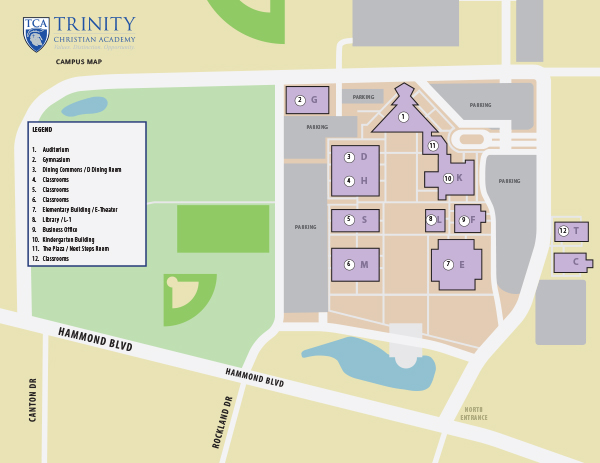
Campus Map
Employment Opportunities!
TCA's food service provider, All Season's Foods, is looking for a fun and energetic person to help with some lite prep work in the kitchen and to assist with point of sale for the two main lunches. Click the button below to learn more!